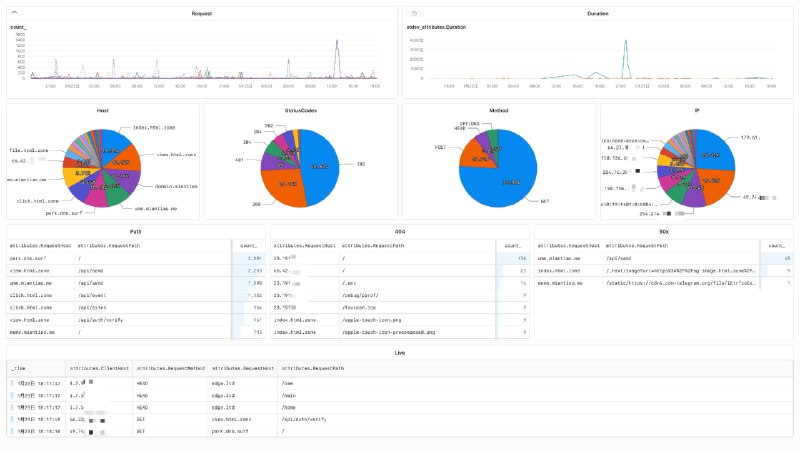
使用 Axiom 给 Traefik 的 accesslog 搞了个大盘
记录下过程:
1、升级 Traefik 版本到 3.2.0 以上,才可以支持 accesslog 的 otlp 插件。
a. Dokploy 的 Traefik 默认是 3.1.2,需要修改安装脚本升级到 3.2.0 以上。
2、在 Axiom 创建两个 Dataset: dokploy-log 和 dokploy-trace , 并创建 API Key。
3、修改 Traefik 配置文件 `/etc/dokploy/traefik/traefik.yml`:
experimental:
  otlpLogs: true

accesslog:
  otlp:
    http:
      endpoint: https://api.axiom.co
      headers:
        authorization: Bearer xaat-miantiao-replace-me
        x-axiom-dataset: dokploy-log
      tls:
        insecureSkipVerify: true

tracing:
  otlp:
    http:
      endpoint: https://api.axiom.co
      headers:
        authorization: Bearer xaat-miantiao-replace-me
        x-axiom-dataset: dokploy-trace
      tls:
        insecureSkipVerify: true
4、如果使用了 Cloudlfare 代理, 给 websecure 和 web 下面增加配置,可以识别真实 IP。
forwardedHeaders:
trustedIPs:
- "173.245.48.0/20"
- "103.21.244.0/22"
- "103.22.200.0/22"
- "103.31.4.0/22"
- "141.101.64.0/18"
- "108.162.192.0/18"
- "190.93.240.0/20"
- "188.114.96.0/20"
- "197.234.240.0/22"
- "198.41.128.0/17"
- "162.158.0.0/15"
- "104.16.0.0/13"
- "104.24.0.0/14"
- "172.64.0.0/13"
- "131.0.72.0/22"
- "2400:cb00::/32"
- "2606:4700::/32"
- "2803:f800::/32"
- "2405:b500::/32"
- "2405:8100::/32"
- "2a06:98c0::/29"
- "2c0f:f248::/32"
5、重启 Traefik 后在 Axiom 就可以看见实时日志,Trace 的大盘 Axiom 集成了,Log 的需要我们自己创建,由于无法导出现有大盘,需要使用下面的语句手动配置:
# Request
['dokploy-log']
| summarize count() by bin_auto(_time), ['attributes.RequestHost']
| limit 20

# Duration
['dokploy-log']
| summarize stdev(['attributes.Duration']) by bin_auto(_time), ['attributes.RequestHost']
| limit 20

# Host
['dokploy-log']
| summarize count() by bin_auto(_time), ['attributes.RequestHost']
| limit 20

# StatusCode
['dokploy-log']
| summarize count() by bin_auto(_time), ['attributes.DownstreamStatus']
| limit 20

# Method IP 同上

# Path
['dokploy-log']
| summarize count() by bin_auto(_time), ['attributes.RequestHost'], ['attributes.RequestPath']
| order by ['count_'] desc
| limit 20

# 404
['dokploy-log']
| where ['attributes.DownstreamStatus'] == 404
| summarize count() by bin_auto(_time), ['attributes.RequestHost'], ['attributes.RequestPath']
| order by ['count_'] desc
| limit 20

# 50x
['dokploy-log']
| where ['attributes.DownstreamStatus'] >= 500
| summarize count() by bin_auto(_time), ['attributes.RequestHost'], ['attributes.RequestPath']
| order by ['count_'] desc
| limit 20

# Live
['dokploy-log']